The forecast for the day you already had.
Hindcast notices where your work happened and reconstructs the day for you to review and bill.
No timer to start. Nothing to remember. Nothing leaves your Mac.

How it works
It notices
Hindcast records the application and window you are in, and when that changes. The day fills itself in while you work, and idle time and gaps stay visible instead of being smoothed over.
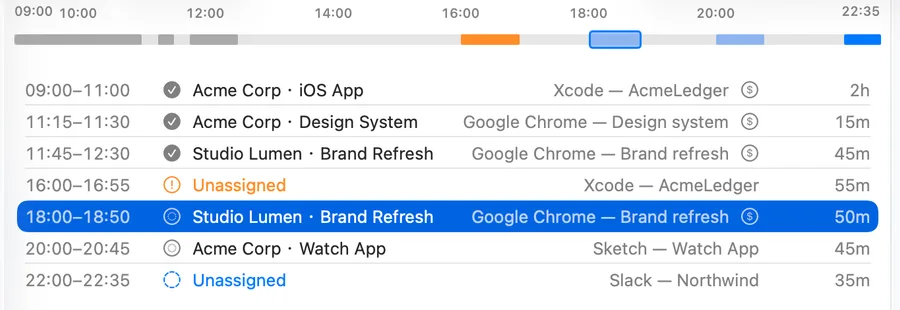
You review
Every day arrives as blocks of time with the context that produced them. Correct a block once and Hindcast offers to remember it as a rule, so the same context is suggested — with its reason shown — the next time it appears.
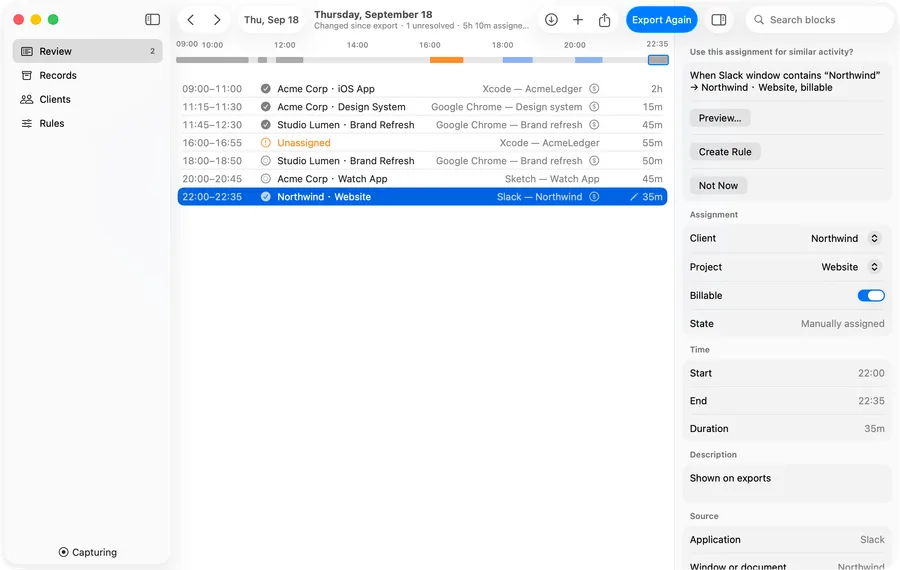
You bill
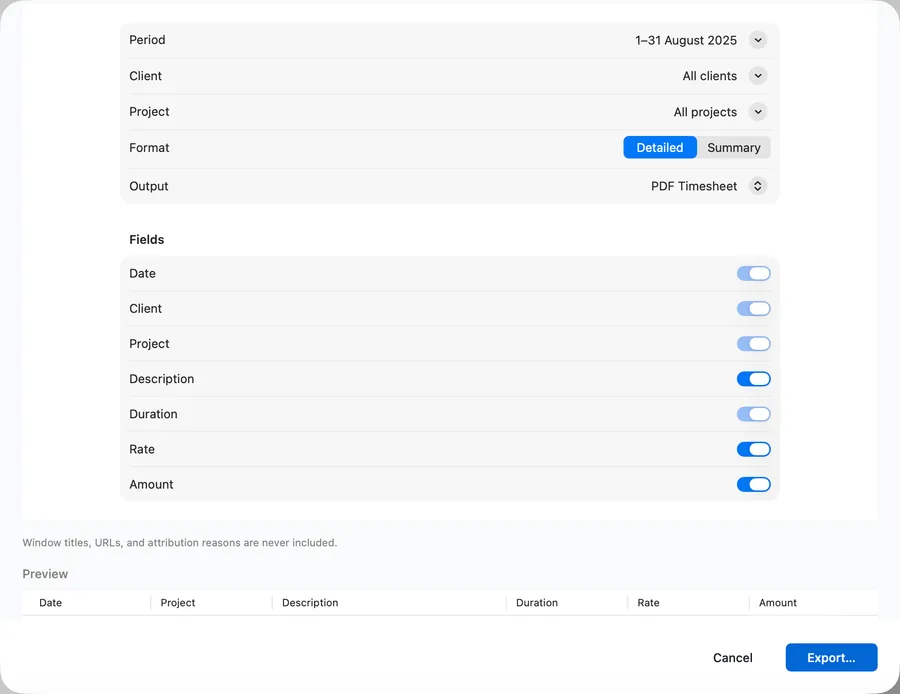
Mark a day ready to bill and the record keeps the total, the rate and what has already been exported. The export writes the timesheet from the blocks you approved, not from an estimate.


Privacy
Your activity stays on this Mac. Hindcast goes online only to check your license and look for updates, and never sends what you did.
Records
- applications you use
- window and document titles
- browser domain, if you allow it
- when each of those changed
Never records
- screen contents
- keystrokes
- full web addresses or page contents
The privacy policy, in full.
Pricing
One person, up to two Macs, every 1.x update.
14-day trial with every feature. No account, no card.
When the trial ends, recording never stops, so no day is lost. Your history stays readable and Export All Data keeps working; Review editing, Rules and Export need a license.
Questions
Why not the Mac App Store?
An App Store app runs in a sandbox that cannot be granted the Accessibility permission, so a store edition could not read the window and document titles Hindcast is built on.
What leaves my Mac?
License activation and checks send your license key, an activation id for this Mac and the app version; update checks ask for the newest version. Neither carries anything about what you did, and there is no analytics, tracker or third-party SDK in the app.
What happens after the trial?
Recording keeps running, so no day is lost, and nothing is locked away — your history stays readable and Export All Data keeps working. Review editing, Rules and Export need a license.
Does Hindcast take screenshots or record keystrokes?
No. It records the application and window you are in, and when that changed. Screen contents, keystrokes and page contents are never recorded.
The Hindcast icon is missing from my menu bar.
One of two things, and Hindcast can see that its item is not drawn but not which one it is. Either the menu bar is full — it holds a fixed amount, macOS fills it from the right, and an item with no room left is simply not drawn — or your Mac has a notch, and the item's slot falls in the span the notch occupies. Quitting a couple of menu-bar apps frees the room and the icon comes back on its own; a menu-bar manager, which decides which items are drawn and keeps the rest on demand, does the same job deliberately. Nothing is lost while it is not drawn — recording carries on, and the main window's Capture menu carries the same status, the same Pause and Resume, and Open Review. If you have a second display, look at its menu bar; the item is usually still drawn there. The Support page explains this in full.
Which Macs does it run on?
Any Mac on macOS 14 or later. One license covers one person on up to two Macs.
What does the export produce?
A timesheet built from the blocks you reviewed, as CSV or as a print-ready PDF, with the fields and the rounding you choose. Window titles, web addresses and attribution reasons are never included.